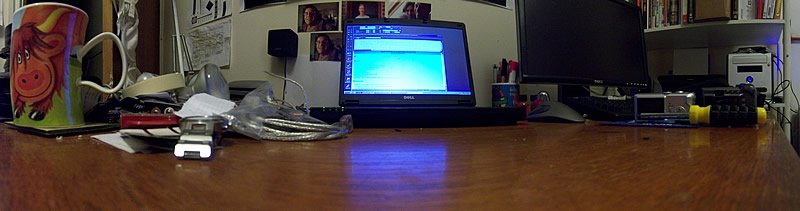
New Dell Inspiron 1300


I've had this Dell Inspiron 1300 (in the middle) for a week or two now, as a replacement for the dead Toshiba Satellite Pro 6100 that Toshiba wanted £520 to repair! The Dell cost me £336 inc vat and delivery, and I also bought another 512mb from the excellent Crucial for £36. The Inspiron has a 1.5ghz Celeron-M (1mb cache version of the Pentium-M), 768mb DDR2 ram, DVDRW/CDRW, 15.4" widescreen TFT, built in wireless, and a long life battery. Flipping bargain if you ask me. I've also managed to sell the dead Toshiba on ebay for £139! Panoramic courtesty of the cute little Kodak Easyshare V570. The Dell has a nice keyboard that is easy (and enjoyable) to touch-type on. The base and screen plastics feel solid and robust, and the built in wifi works well through-out the house.

Added this new page to the site: The Animals of Sefton Park, Liverpool.

Comments

Popular posts from this blog

Nikon Coolscan Scanner Drivers (USB and 1394 Firewire)

If you're looking for Windows drivers for the following Nikon Coolscan film and slide scanners: Nikon Coolscan IV (40) Nikon Coolscan V (50) Nikon Coolscan 4000 (Firewire) Nikon Coolscan 5000 Nikon Coolscan 8000 (Firewire) Nikon Coolscan 9000 (Firewire) Then please use this link, which is a ZIP file, containing drivers for the USB and Firewire (1394) Nikon Coolscan scanners*: https://drive.google.com/uc?export=download&id=1Tgr7LhL8UtzgUpor26-Z1jCiytz7HkAH If you're looking for the Nikon Scan software, then you can find the full version available for download from Nikon's website, as well as the last update for the Nikon Scan software: Nikon Scan v4.03 Download Older for reference: Nikon Scan v4 Download Nikon Scan v4.0.2 Update * Also includes drivers for LS-10, LS-20, 2000, III (LS-30), Nikon SCSI scanners. You shouldn't need these drivers, but are provided just in case.   Here you can watch this video on how to install the Nikon Coolscan scann...

Top 45 Best Things To Do With An Old PC *(26 + 19)

If you're looking for some great things to do with an old or spare PC, then this list is for you. I used to have a website, with lots of PC / computer content on there. One article was 26 things to do with an old 486 PC. Some may still be relevant, but I've decided to list some of the new, interesting, fun, and more modern ideas first. Remember the AMD Athlon XP? Things to do with an old(ish) PC: 1 - Run as an old PC/Dos/Windows Gaming Machine If you're hardcore you may be able to find a 3dfx Voodoo graphics card to play all the old school 3D games. You could use DOSBox to run a DOS emulator on your PC, or alternatively you can start from the beginning and install MS-DOS, and then Windows 95 on top. 2 - Run as an arcade machine / emulator - MAME etc Get MAME and you can emulate an old arcade machine to play original arcade games. Remember GoldenAxe on the Amiga and Atari ST? Well, image it a whole lot better, with the original arcade version. Here's a q...

MD.45 The Craving Dave Mustaine Vocals 2004 Remastered

1996 - Dave Mustaine got together with Lee Ving (Voice, Harmonica, Lyrics), Kelly Lemieux (Bass), Jimmy DeGrasso (Drums) and played Guitar and wrote lyrics to record the album called MD.45 - The Craving, creating a "punk metal record". It was at a time when Dave was unhappy with what Megadeth were doing (Cryptic Writings, Risk). Musically great, however, fans of Megadeth / Dave Mustaine, were somewhat disappointed with the vocals. Fast forward to 2004 - Dave Mustaine is remixing and remastering all his albums, one of them is MD.45 - The Craving. Unfortunately half the recording (Vocals, Harmonica) was recorded in a different studio, which had since shut. Unable to remix / remaster from the original recordings, Dave Mustaine decided to re-record the vocals and harmonica by singing himself and simulating the harmonica parts on guitar. MD.45 The Craving - Dave Mustaine Vocals (2004 Remastered) - Fans of Megadeth will enjoy this album. I listened to the original '96 versio...